Related Topics
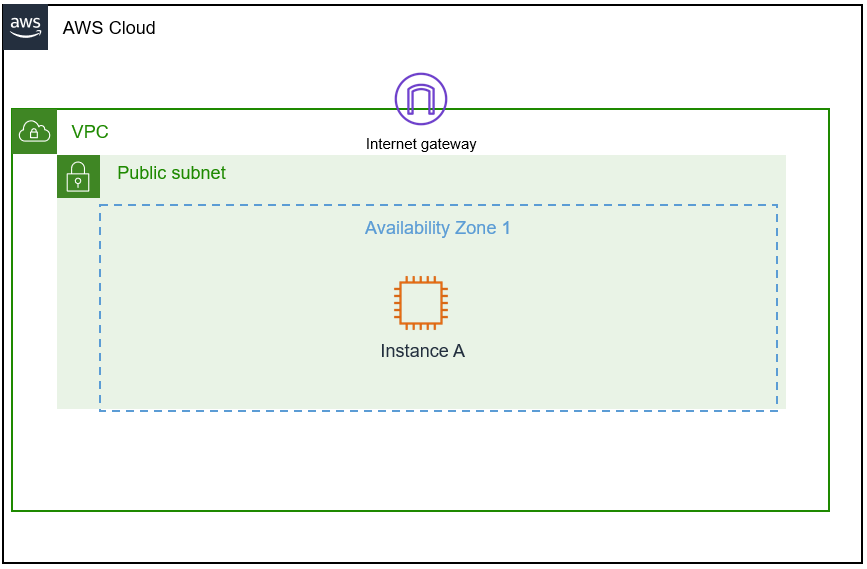 VPC Architecture
 Completed VPC Example
 VPC Successfully Created
×
![]()
I successfully accomplished the following objectives:
As a cloud support engineer at AWS, I received the following ticket from a startup customer:
Ticket from customer
Hello, Cloud Support!
I'm new to AWS, and I need help setting up a VPC. Can you please help me through the setup process? I would like to build only the VPC part and would like to make it look something like the following picture. Can you help me ensure I have around 15,000 private IP addresses in this VPC available? I would also like the VPC IPv4 CIDR block to be a 192.x.x.x. I don't remember which is a private range though. Can you confirm that? I would also like to allocate at least 50 IP addresses for the public subnet.
Thanks!
Paulo Santos
Startup Owner
In the customer's VPC architecture, Paulo needed approximately 15,000 IP addresses for their Seattle office headquarters and 50 IP addresses for their operations department, which would be in the public subnet.
Before starting the implementation, I took some time to review what a VPC is and the key concepts involved:
To determine the appropriate CIDR range for the customer's requirements, I utilized these resources:
For the task, I needed to investigate Paulo's requirements and build a VPC environment based on these needs, then create a simple walkthrough for him to follow. Paulo had switched to AWS and needed help launching his first VPC. He had some networking knowledge but was new to AWS, needing around 15,000 IP addresses in the private range and at least 50 IP addresses in a public subnet.
I logged into the AWS Management Console and navigated to the VPC service by typing "VPC" in the search bar at the top-left corner.
From the Amazon VPC dashboard, I clicked the Launch VPC Wizard button to start creating the VPC. This launched a step-by-step process to set up a VPC with its basic components.
In the wizard, I followed these steps to launch the VPC:
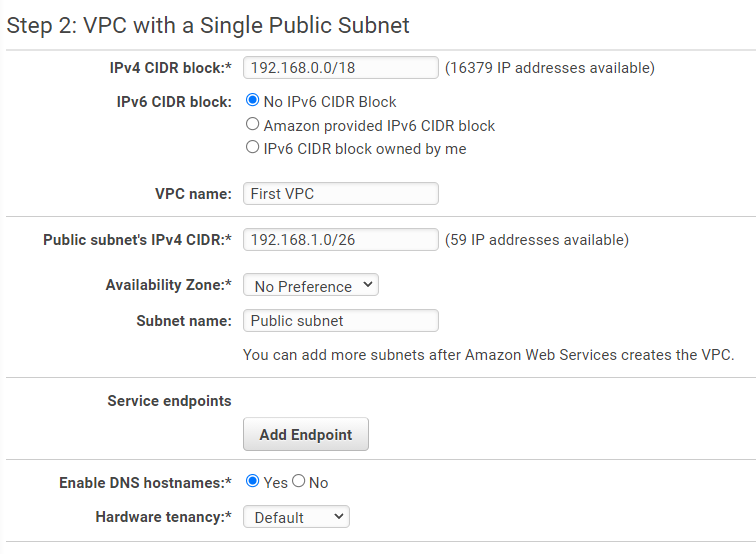
I took a moment to review the four available VPC configuration options. Based on Paulo's requirements, I selected VPC with a Single Public Subnet and clicked Select to proceed.
I reflected on which VPC configurations had been used in previous setups. They had been using VPCs with one subnet, depending on customer needs - some with multiple public-only subnets or combinations of public and private subnets.
I also considered why there are both private and public subnets:
For the "VPC with a Single Public Subnet" option, I configured the following settings:
I thought about why private IP addresses are used within the VPC and concluded that they're not reachable over or from the internet, which keeps resources and communications private within the VPC.
After configuring all settings, I clicked Create VPC at the lower-right of the screen.
Once I successfully created the VPC, I saw a pop-up message saying "VPC Successfully Created." To verify that my VPC was available, I checked the "Your VPCs" section in the left navigation menu and confirmed that my VPC was listed.
To summarize what I accomplished for Paulo:
This solution satisfies all of Paulo's requirements and provides a solid foundation for him to build his AWS infrastructure upon.
VPC Architecture
Completed VPC Example
VPC Successfully Created