Troubleshooting a Network Issue
Project Overview
In this project, I worked on troubleshooting a network issue for a
customer named Ana. She was having trouble reaching her Apache server
and couldn't successfully load it on a webpage from her virtual private
cloud (VPC).
My objectives for this project were:
- Analyze the customer scenario
- Troubleshoot the issue
I had an exact replica of the customer's VPC and its resources to work
with, which made it easier to identify and resolve the problem.
Task 1: Understanding the Problem
First, I needed to understand what Ana was experiencing. She couldn't
reach her Apache server or get it to successfully load on a webpage from
her VPC. This gave me a clear focus for my troubleshooting efforts.
The key was to methodically check each component that could be causing
the connectivity issue.
Task 2: Install httpd
Before checking the customer's resources, I needed to install httpd to
replicate the environment.
Checking the Status of the httpd Service
I started by checking the status of the httpd service using the
systemctl command:
sudo systemctl status httpd.service
The status showed that the httpd service was inactive because it had not
been started yet. This output indicated that the httpd service was
loaded (already installed) but was currently inactive.
Starting the httpd Service
To start the httpd service, I entered the following command:
sudo systemctl start httpd.service
Verifying the Service Status
I checked the status again to confirm it was running:
sudo systemctl status httpd.service
The Apache HTTP Server was now in the Active status, confirming the
service was running.
Testing the Web Server
To check if it was working, I opened a new browser tab and entered the
public IP of my instance:
http://<PUBLIC IP OF INSTANCE>
Task 3: Investigate the customer's VPC configuration
With httpd installed and running, I turned my attention to investigating
Ana's VPC and resources. I kept in mind the error I received when trying
to load Apache in the web browser while troubleshooting this issue.
Accessing the AWS Management Console
I opened the AWS Management Console and navigated to the VPC service.
From there, I used the left navigation pane to methodically check each
service within the VPC to confirm that each resource was configured
correctly.
Methodical Troubleshooting
I checked the following components one by one:
-
Subnets - I verified that the route tables were
associated with the correct subnets.
-
Route Tables - I confirmed the route tables had the
correct routes configured.
-
Internet Gateway - I checked that there was an
Internet Gateway and that it was properly attached.
-
Security Groups and network ACLs - I reviewed all the
rules to ensure they were correctly configured.
Can you ping websites such as www.amazon.com? If so, you can get to the
internet (the internet gateway and route table should work).
Apache is a server that commonly uses HTTP/S as ports.
Identifying the Issue
After going through each option, such as routing, security, and
resources, I discovered that the security group rules were not properly
configured to allow HTTP traffic. The security group needed to have port
80 opened for inbound traffic.
Fixing the Security Group Configuration
I updated the security group rules to allow HTTP traffic (port 80) from
the internet.
Testing the Solution
After making the necessary changes, I confirmed that the Apache HTTP
server was working by testing the following URL in a browser:
http://<PUBLIC IP OF INSTANCE>
This time, the Apache test page loaded successfully, confirming that I
had resolved the issue.
Recap
I successfully troubleshot the customer's networking issue.
I found that Ana had an issue with her security ports in the security
group. After fixing the issue by opening port 80 for HTTP traffic, I was
able to successfully load the Apache server.
This project reinforced the importance of methodical troubleshooting and
checking each component of a network configuration when diagnosing
connectivity issues.
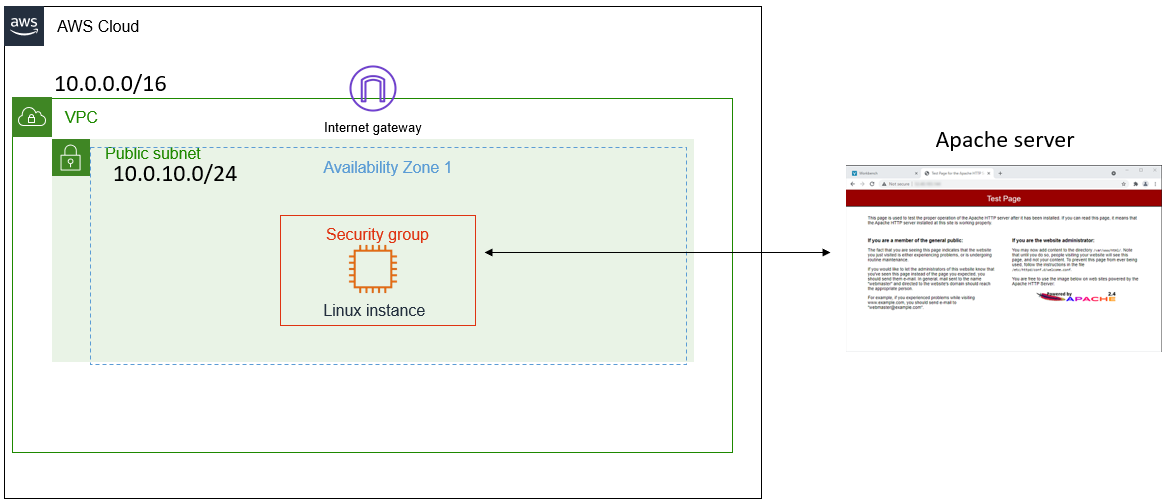 Customers VPC Architecture
 Status Shows HTTPD Has Not Been Started Yet
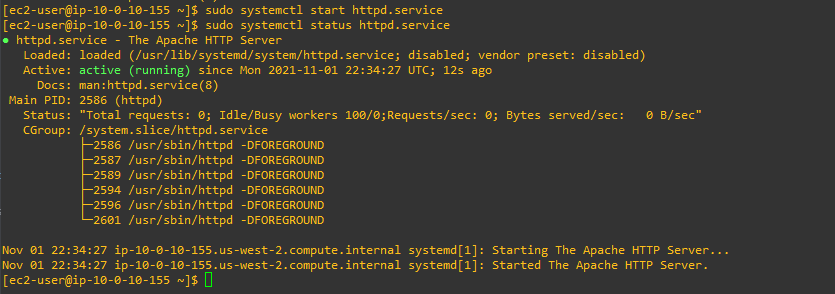 Apache HTTPD Server Now Active
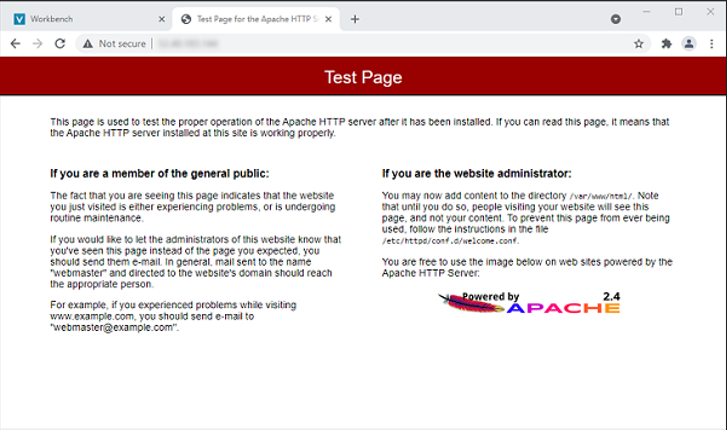 Test Page of Apache HTTP Server Successfully Installed
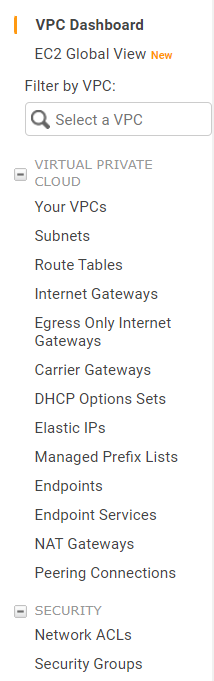 Checked Each Service Within VPC Panel To Ensure Proper Configuration